
Apache Kafka Basics
Understanding the core components of Kafka for System design interviews

Appreciate you reading this newsletter, I am writing as I learn and explore these topics in depth. I hope the content and resources are helping you level up as an engineer. If you want me to write about something specific, just message me or comment on the post.
Note: This article on was originally published on my personal website - https://pradyumnachippigiri.dev/blogs/kafka-fundamentals
Here’s what I learned this week
This article is my attempt to make Kafka feel intuitive and easy to understand, we’ll walk through the core building blocks of Kafka with solid reasoning behind the design decision.
Let’s dive in..
What is Kafka ?
Kafka documentation states that “Apache Kafka is an open-source, highly scalable, durable, fault-tolerant distributed event streaming platform”. Variety of companies use Kafka in production systems, you can access the list of companies that use Kafka here.
Stream is a continuous flow of data (that we call records/messages/events). These messages are published by the producers and the consumers read and process the messages.
Kafka/any streaming platform handles this workflow efficiently by possessing the following capabilities :
Collect the data sent from multiple producers, and store them.
Make sure the stored messages are not lost even during outages/failures.
Be scalable incase of heavy load.
Exhibit Fault tolerant behaviour
Enable access to multiple consumers
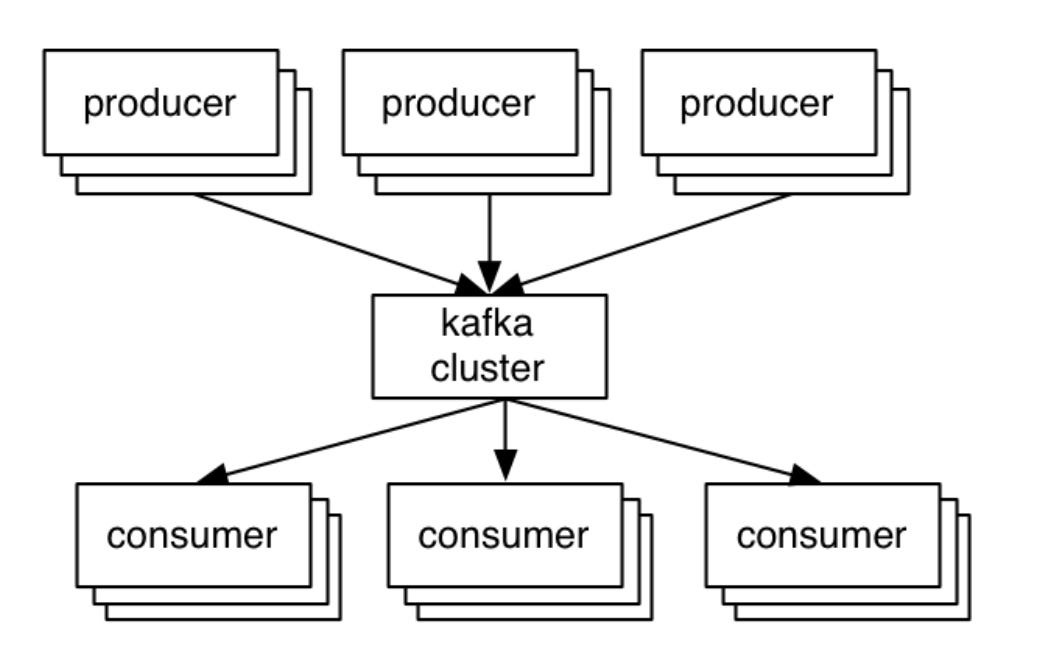
In a nutshell, Kafka works on the traditional client-server architecture. The server is Kafka, the producer and the consumer are the clients. The communication between client and server happens via customized high-performance TCP protocol implemented by the Kafka team. There are client libraries available for all most all programming languages.
Kafka Architecture
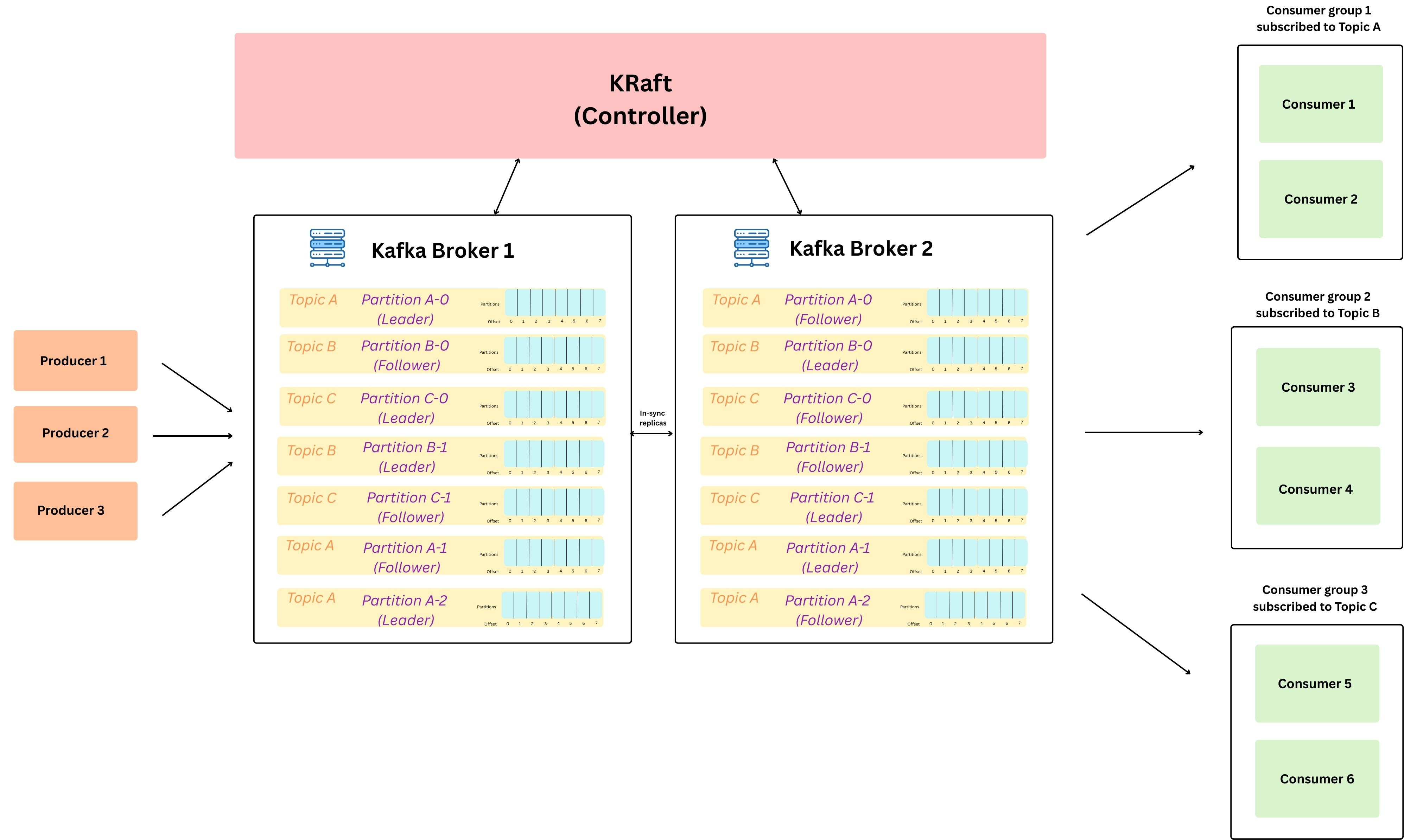
On a higher level, this is how the kafka architecture looks like, in the sections below we will go over all the key components.. (Keep referring back to this image, incase you want a visual understanding of any component, as to where a block sits. )
Message Structure
A message (also called data / record / event) is the basic unit of data stored inside thenKafka log. (which we will discuss in sometime.. ) We can think of a message like a row in a database.
This message/event represents something that happened. (like a trigger for asyc processing)
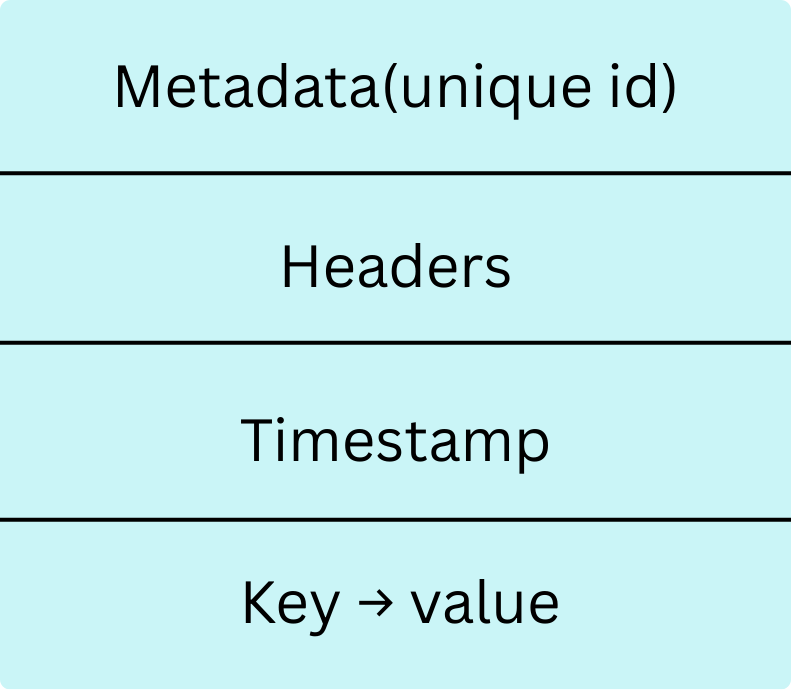
An event describes something that happened. For example, in an e-commerce system, examples of events can be “an order is created”, “an item is added to cart”, “an order is delivered”. In Kafka, we read or write data in form of events. We can send this data in XML, JSON or Avro
Each message is nothing but a key-value pair, which looks like this.
{
  "order_id": "order-1234",
  "order_amount": "50.00",
  "created_by": "praddy",
  "created_on": "2026-02-09T22:02:00Z"
}
Topics
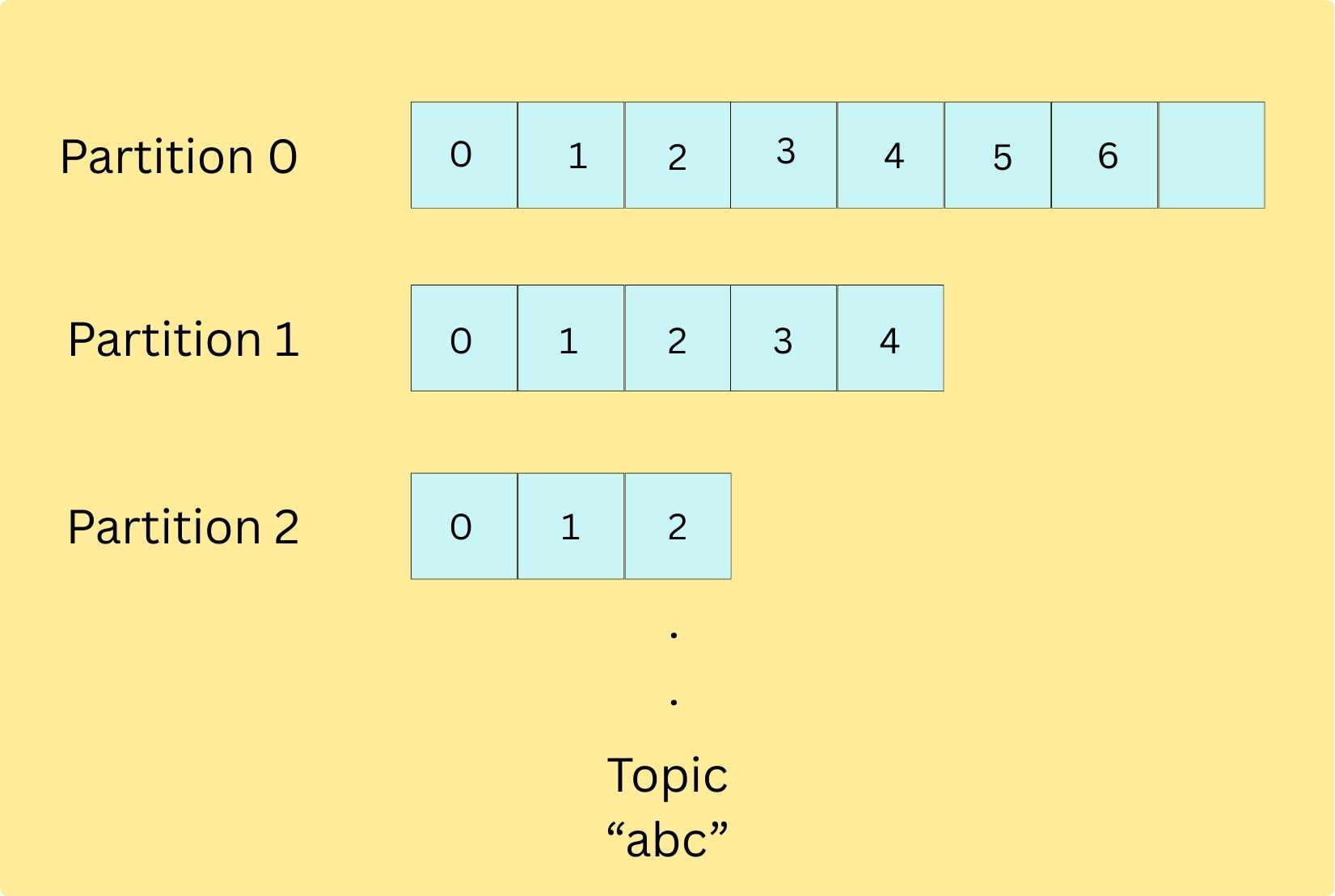
In a real system, there are multiple kinds of events flowing continuously like orders, payments, application logs, etc. It makes sense to group these related events together, and in Kafka this grouping is called a topic.
So Topic is basically just a logical abstraction: it is a named stream that groups related records together.
We can think of kafka topics like a table in a database (collection of related records), or a folder in a file system (collection of related files)
Every Kafka message is published to exactly one topic. We can have multiple topics in our Kafka cluster each storing a specific category of events.
Topics are the way you publish and subscribe to data in Kafka. When you publish a message, you publish it to a topic, and when you consume a message, you consume it from a topic. Topics are always multi-producer; that is, a topic can have zero, one, or many producers that write data to it.
Internally, each topic is a combination of multiple partitions.
Partitions
Hussein Nasser always quotes that “the best way to work with billions of rows in a database is to avoid working with billions of row.” That’s exactly how even Kafka works.
Just like how a database shards data when a single node becomes a write bottleneck, Exactly how even kafka scales write throughput by increasing the number of partition’s in a topic, this allows the writes to happen in parallel.
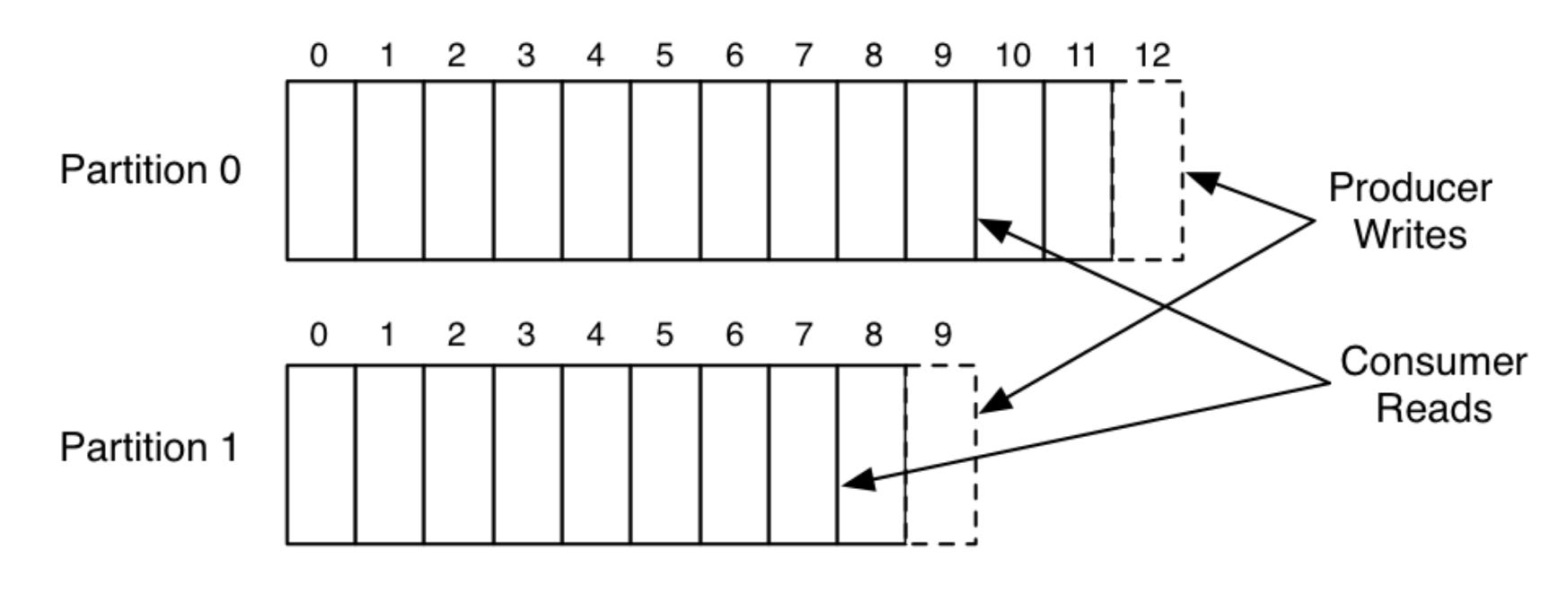
Partition is nothing but an ordered, immutable, append-only log of messages (Just like write ahead logs in db) Since the messages are always appended, they can be read in the same order from beginning to end.
Partitioning gives kafka, the ability to scale out (meaning, partitions can spread across cluster of machines) and hence now it can hold more data than how much a single machine could have handled. Since, its partitioned, everything like storage, reads, and writes gets distributed across the cluster: producers can write to multiple partitions in parallel, and consumers can read from multiple partitions in parallel.
Each partition contains a different subset of the topic’s data meaning if we take the union of records across all partitions, we get all the records that belong to the topic.
Offset : Offset is a unique identifier assigned to each message within a partition. It like the position number of that message in the log (0, 1, 2, ...).
We will talk about why offsets are useful in the COnsumers section below.
Important note is that these logs are persistent meaning, every message receieved is that immediately written to the disk.
Below is a simple example of a single producer, and a single consumer writing and reading from a 2-partition topic, borrowed the image from Linkedin’s Engineering Blog
Kafka Broker
Kafka brokers are basically the servers that run Kafka. We talked about how producers publish data to a topic, and consumers consume from the topic. We also talked about how the data is appended into an append-only log inside partitions. But where does all of this actually live and run?
That’s where brokers come in.
When a producer publishes an event to a topic, Kafka automatically routes that event to the correct partition of that topic. That partition is stored on some broker, and the broker is responsible for receiving the write request and persisting the event to disk. Similarly, when a consumer subscribes to a topic, it reads the data by fetching messages from the brokers that host the partitions for that topic.
A Kafka cluster is simply a group of multiple brokers working together. Having multiple brokers allows Kafka to distribute partitions across machines, handle high traffic, and stay available, even if one broker goes down. So by adding more brokers, Kafka can scale horizontally without changing producer or consumer code.
Producers
A producer is a client application that publishes events to Kafka topics. Producers send records to a topic, and Kafka routes those records to the appropriate partitions, which are stored on brokers.
Question : We said “producers send data to a topic” and “data ends up in a partition on a broker” but how does Kafka decide which partition a record should go to? And can producers control that?
Answer:
Kafka follows a few simple rules:
If the producer does not provide a key, Kafka distributes records across partitions to balance load (commonly round-robin or sticky partitioning depending on the client).
If the producer does provide a key, Kafka uses that key to consistently choose a partition.
Under the hood, this is usually:
Partition no = hash(key) % p, where
p= number of partitionsMessages with the same key always go to the same partition, which means they are stored in order within that partition
If we decide to change the number of partitions
plater (increase/decrease), the same key may start routing to a different partition, so there might not be ordering guarantee. (so its always adviced to choose the partition number upfront based on the parallelism and throughput needs. )
If needed, producers can also:
Directly specify the partition number, or
Implement a custom partitioning logic (useful, but should be done carefully to avoid hot partitions and uneven load)
I’ll write a separate article in the coming weeks on the internals of the Kafka Producer. There’s a lot happening behind the scenes when you call the Producer API, and understanding it makes it much easier to reason about scaling, idempotency, retries, and delivery guarantees.
Consumers
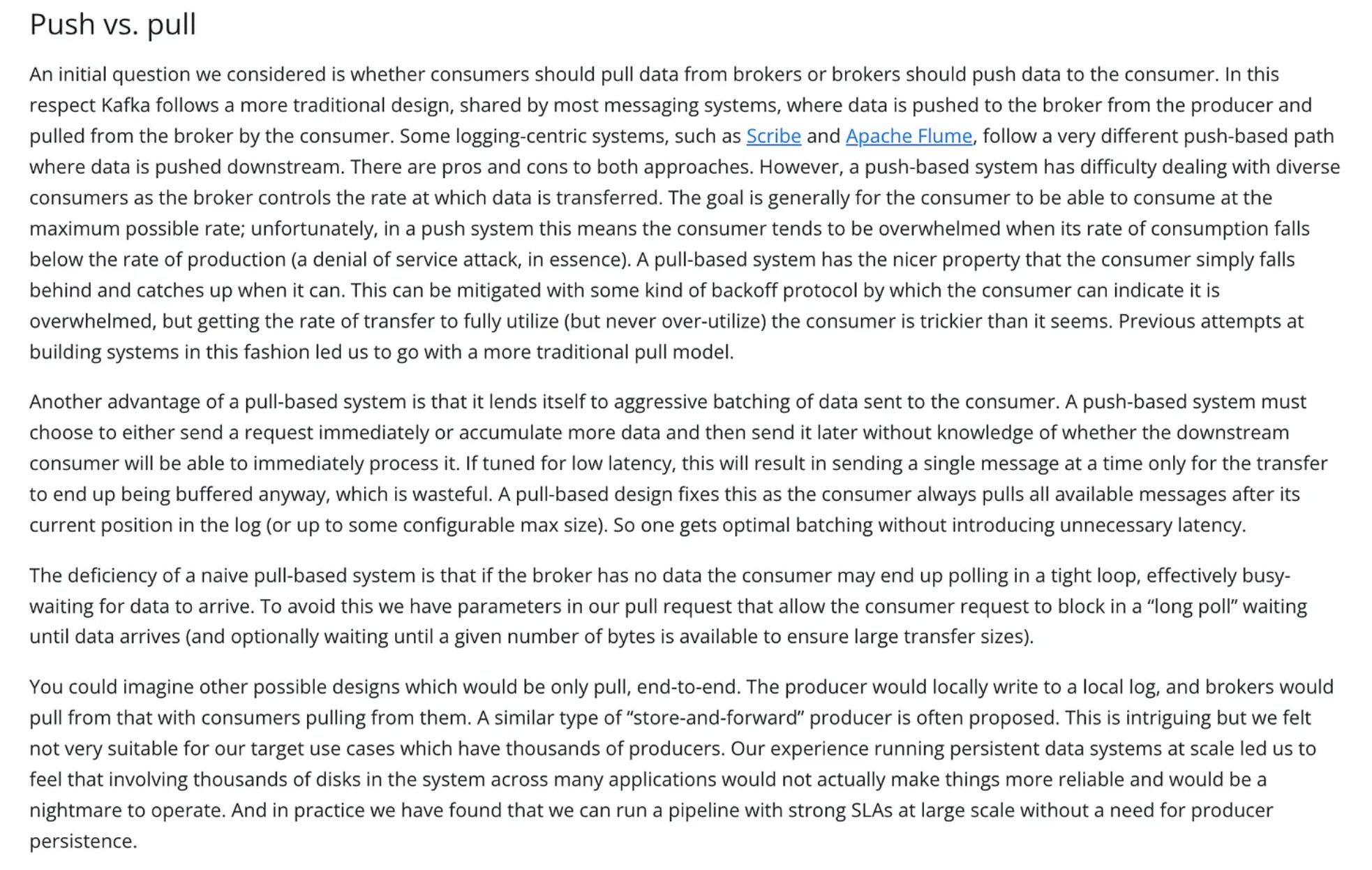
A consumer is a client application that subscribes to one or more Kafka topics and reads records from them. Internally, consumers always read from partitions, not from a topic as a whole. They work on a pull based model.
here’s a wonderful write up from this page of Kafka documentation, as to why they chose pull over push for consumers.
Question : if a topic has multiple partitions and you spin up multiple consumers, how does Kafka decide who reads what, and how does it avoid two consumers accidentally processing the same message (and avoid duplicate processing while preserving ordering)?
Answer:
If consumers were allowed to read partitions independently without any coordination, then every consumer could end up reading the same partitions and hence the same messages, leading to duplicate processing.
Kafka solves this by introducing consumer groups. A consumer group is just a logical grouping of consumers identified by the same group.id. When multiple consumers join the same group, Kafka treats them like a team that wants to share the work, and it enforces a very important rule:
each partition is assigned to at most one consumer within the group
A consumer can read from one or more partitions, but no two consumers in the same group will read from the same partition. This keeps ordering intact (since each partition is an ordered log) and ensures that each message is processed only once per consumer group. (but different consumers in different consumer groups can consume from those partitions.. ).
So since consumers in a consumer group are consuming from partitions, here’s how they are related.:
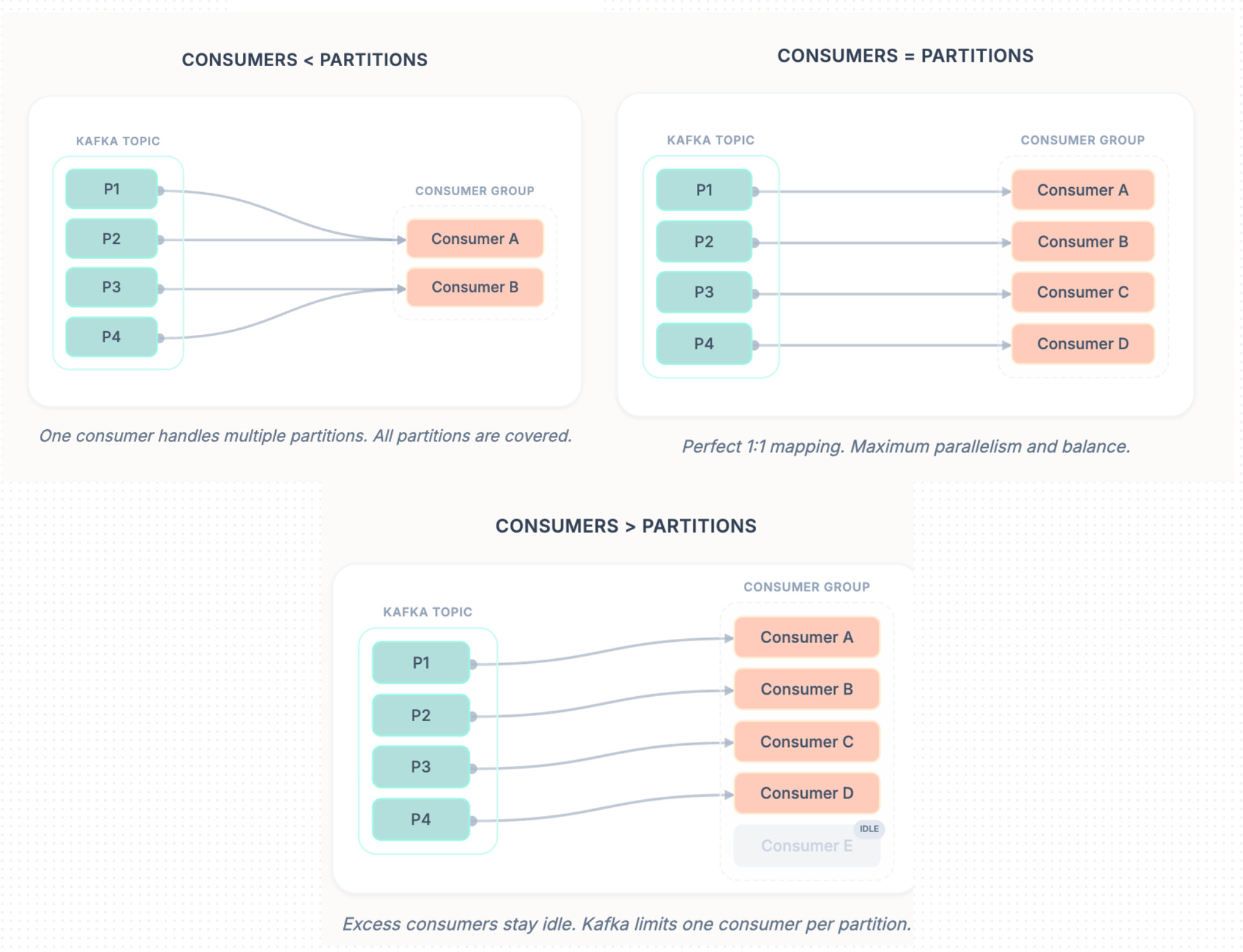
If number of consumers in a consumer group < number of partitions of the topic it is consuming from → each consumer is assigned multiple partitions
If number of consumers in a consumer group == number of partitions of the topic it is consuming from → each consumer is assigned exactly one partition
If number of consumers in a consumer group > number of partitions of the topic it is consuming from → extra consumers remain idle (for that topic)
If a consumer group subscribes to multiple topics → this assignment logic is applied independently per topic
Now remember the offset we briefly introduced earlier as the position number (0, 1, 2…) of a message inside a partition, this is exactly why offsets are useful. As consumers read from a partition, Kafka tracks how far they have read using offsets, and these offsets are tracked per consumer group, per partition. Kafka stores these committed offsets inside an internal Kafka topic called __consumer_offsets, which is how Kafka can remember progress even if a consumer crashes or restarts. Because of this, consumers can resume from where they left off after failures, and different consumer groups can consume the same topic independently with their own progress
I will dedicate a seperate article to discuss on the internals of kafka Consumers
Replication
Till now, we talked about how partitions store data on brokers. But if a partition existed on only one broker, Kafka would not be fault tolerant,, if that broker went down, data would be unavailable or even lost right. Kafka solves this using replication.
Leader Replica: Each partition has one replica elected as the leader, and that leader lives on a broker. Producers and consumers always talk to the leader for that partition (writes and reads happen via the leader).
Follower Replicas: The same partition is replicated onto other brokers as followers. Followers don’t serve client traffic, they passively replicate data from the leader.
Distributed Leadership: In the architecture diagram above, notice how leaders are spread across brokers (ex: Partition A-0 leader on Broker 1, Partition A-1 leader on Broker 2). This is intentional so read/write load is distributed and no single broker becomes a hotspot.
ISR (In-Sync Replicas): Followers that are fully caught up with the leader are part of the ISR. ISR is critical because only an in-sync follower can safely be promoted as the next leader without losing acknowledged data.
Failover: If the broker hosting a partition leader goes down, Kafka promotes one of the ISR followers as the new leader, so producers and consumers can continue operating with minimal downtime. When the failed broker returns, it usually rejoins as a follower and starts replicating again.
At this point, we understand what replication is and why Kafka uses leaders, followers, and ISR. But this naturally raises the next question: who tracks broker liveness, who decides leaders, and who coordinates failover and metadata updates? That responsibility belongs to Kafka’s control plane the KRaft Controller.
KRaft Controller
Kafka replication and failover only work if the cluster has a single, consistent authority that coordinates metadata changes. That role is handled by the Kafka Controller (Kafka’s control plane).
At a high level, the controller’s responsibilities include:
Leader assignment: deciding which replica is the leader for each partition
Managing replication state: tracking replicas and maintaining the ISR set
Broker health monitoring: detecting when brokers go down or come back up
Failover coordination: when a leader broker fails, promoting an in-sync follower as the new leader so the partition stays available
Earlier versions of Kafka used ZooKeeper for this coordination. Modern Kafka replaced ZooKeeper with KRaft (Kafka Raft), where Kafka manages this metadata internally (no external dependency).
One important note: the controller doesn’t handle data traffic, producers and consumers don’t talk to KRaft directly. Kraft just coordinates the cluster/brokers in the background so Kafka keeps working correctly even as brokers come and go.
Well, this article was covering the fundamentals of Kafka, In the coming months, we’ll go deeper into the parts that matter when you actually run Kafka in production:
Kafka Producer Internals : Deep dive into the Producer API
Kafka Consumer Internals : Deep dive into how Consumer API works
End to End delivery semantics : At-least-once vs at-most-once vs exactly-once, how duplicates happen, how idempotency and transactions work, and what guarantees Kafka can (and cannot) provide.
If you liked this article, feel free to like, subscribe, and drop a comment to spark a discussion, so we can all learn from each other. And if you think it’ll help someone, share it with your friends or on social media.
If you’d like 1:1 help (system design, backend, DSA, resume review etc.), you can book a session with me on Topmate
If you found this useful and want to support my work, you can also buy me a coffee ☕
buymeacoffee.com/cpradyumnao
Nice article
Nice Article