
Engineering Fast Search with Inverted Indexes
How modern search systems organize and work for efficient and fast information retrieval.

Search has become a part of our daily lives, whether on the web or within an app. But have you ever wondered how it actually works? What happens when you search for something, and how does the system filter through massive amounts of information in just a few milliseconds?
In this article, let’s talk about inverted indexes, the data structure behind search.
How does search work ?
Firsty, Let's understand how you'd search for a word in a given corpus of documents. Let's start with the naive way:
Given the below documents, say the word to search is “cricket” :
DOC 1 : I am Pradyumna, I love wathcing cricket.
DOC 2 : Have you every watched a cricket game in a stadium ?
DOC 3 : Pradyumna writes wonderful articles in substack.
The naive approach would be to iterate over all the documents, and all the words inside each documents, and then add the matched result to the final answer.
search("cricket"):
  for each document in corpus:
      for each word in document:
          if word == "cricket":
              add document to results
As we can see the problem here is that to answer just one query we are touching every document , regardless of whether the word appears in one document or across all documents. And every query has to do this from scratch, and when there are million of records or documents, then this linear search becomes slow.
The naive approach isnt wrong, infact it is used when the documents are less , or when the search is required just once.
So this brings us to the data structure used in searches : Inverted Indexes
Inverted Index
In inverted index, the basic idea is to make text search fast so instead of storing the “documents → words it contains” , we try to reverse/invert it to “words → documents that contains it. ”
For example , The inverted index for the 3 documents we considered for the naive approach would be :
"cricket"   -> [DOC1, DOC2]
"Pradyumna" -> [DOC1, DOC3]
"stadium"   -> [DOC2]
"articles"  -> [DOC3]
.... (continued for every word in all the documents)
The list of documents are called as posting lists.
Now a search for "cricket" is just a single dictionary lookup that immediately returns Docs 1 and 2. Searching "cricket stadium" intersects the two postings lists ([1,2] ∩ [2] = [2]), so doc 2 would be the only match.
Optimizations in Inverted Index
Now that we learned about the data structure, lets optimize a bit more on top of that, for faster, efficient, and informative lookups :
Stop Words Removal
Words like “a”, “the”, “an”, “in” , “on” appear in almost every document. So if we store these words in the dictionary then the posting list would grow to contain all the documents, which just takes up memory but are contributing very less for the searches. So most search engines just drop these low information, high frequency words before putting them into the data structure.
Stemming
Next problem is “cricket” , “cricketer”, “cricketing” are all different words but if the user types “cricket” we would essentially want to show them all the documents containing “cricketer”, “cricketing” right.
So Stemming is basically stripping down the word to its root form by removing the suffix after applying some rule based transformations.
Another example :
"watching", "watched", "watch" -> watchLemmatization
Lemmatization does roughly the same job as stemming, reducing words to a base form, but it's smarter about it. Instead of blindly chopping suffixes, it uses an actual vocabulary and grammar knowledge to find the true dictionary form of a word.
cars     → car
children → child
mice     → mouse
better   → good
Richer Posting Lists
So far our postings lists had just a list of document IDs. But we can pack in a lot more metadata information to add additional capabilities in search :
word → [(doc_id, tf, positions, offsets), (doc_id, tf, positions, offsets), ...]Term Frequency (tf) :
How many times the term occurs in the doc
This information is useful for ranking search results. A document in which the search term appears multiple times may be considered more relevant than one in which it appears only once.
Positions :
Where in the doc does the term appear
For example :
DOC1 : AI Agents are the next big thing

Positions
Agents -> (1)
next -> (4)
and so on....
Positions are useful for phrase searches and proximity searches.
For example, while searching for:
"AI Agents"the search engine checks whether the position of
Agentsimmediately follows the position ofAI.This helps in u know much accurate searches.Offsets :
Gives the character positioning
For example :

Offsets
AI -> (0, 2)
Agents -> (3, 9)
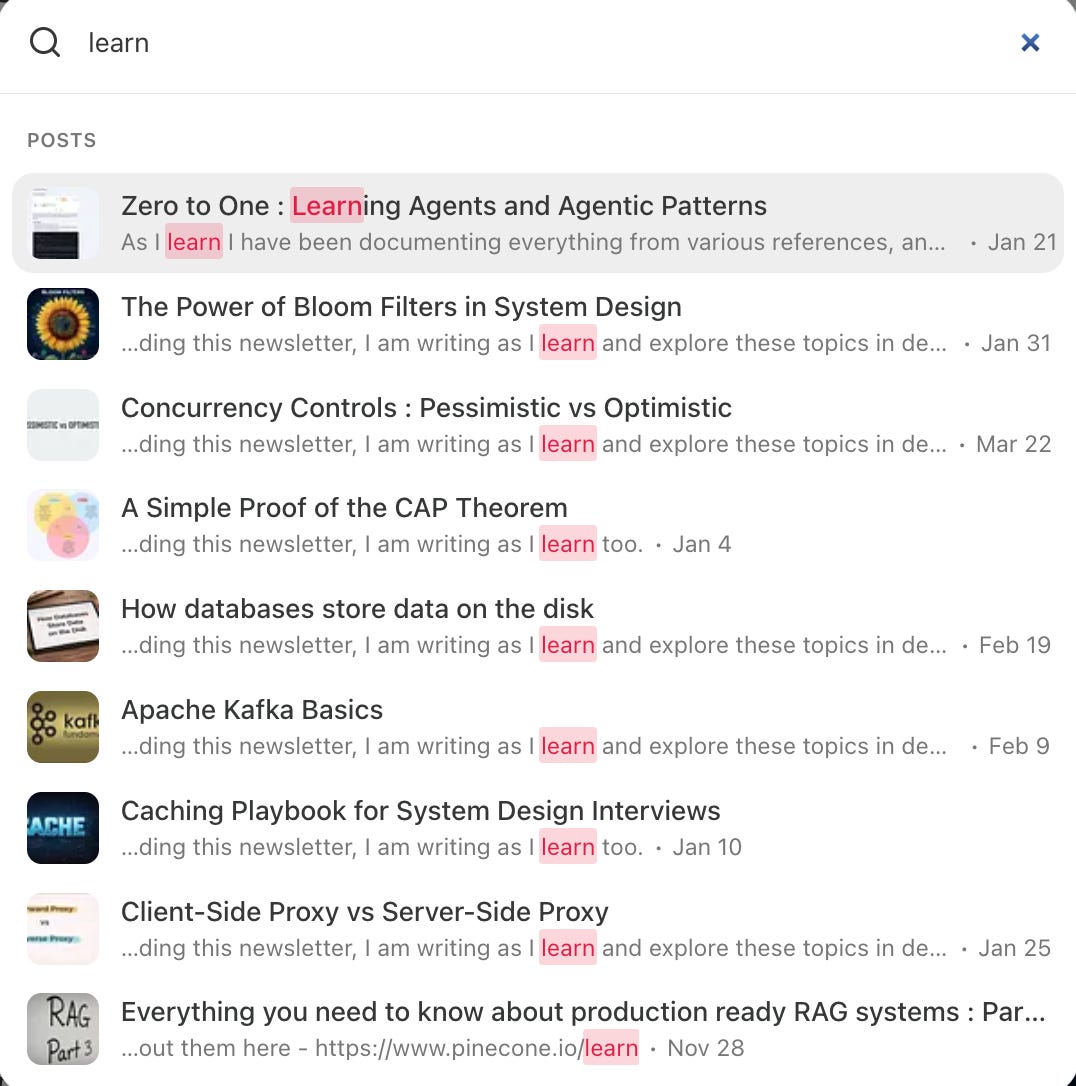
Offsets are mainly useful for highlighting matched words in search results and displaying relevant text snippets. For better viewer experience like you can see below as to how substack search does.
Champion Lists
A champion list stores only the top-ranked documents for each term instead of checking the entire posting list during every search.
For example:
AI → [DOC3, DOC8, DOC1, DOC5, DOC9, ...]The complete posting list may contain thousands of documents. A champion list keeps only the best few:
AI → [DOC3, DOC8, DOC1]These documents are usually selected based on factors such as:
High term frequency
Importance of the term within the document
Overall document quality or popularity
Keeping Posting Lists Sorted
Posting lists are usually stored in ascending order of doc_id.
AI     → [2, 7, 11, 20, 35]
Agents → [1, 7, 11, 18, 35]
Suppose a user searches for:
AI AgentsThe search engine must find the document IDs that occur in both posting lists right. Lets see how it works with both unsorted and sorted lists.
Without sorted posting lists
When the lists are unsorted, the search engine may compare every document in the first list with every document in the second list.
function intersectUnsorted(list1, list2):
    result = []

    for doc1 in list1:
        for doc2 in list2:
            if doc1 == doc2:
                add doc1 to result
                break

    return result
If list1 contains m documents and list2 contains n documents, the time complexity is:
O(m × n)This becomes expensive when the posting lists contain thousands or millions of document IDs.
With sorted posting lists
When both lists are sorted, the search engine can use two pointers and move through both lists from left to right.
function intersectSorted(list1, list2):
    result = []

    i = 0
    j = 0

    while i < length(list1) and j < length(list2):

        if list1[i] == list2[j]:
            add list1[i] to result
            i = i + 1
            j = j + 1

        else if list1[i] < list2[j]:
            i = i + 1

        else:
            j = j + 1

    return result
For example:
AI     → [2, 7, 11, 20, 35]
Agents → [1, 7, 11, 18, 35]
The result is:
[7, 11, 35]The time complexity is:
O(m + n)Therefore, keeping posting lists sorted makes queries containing more than 1 word much faster
Posting List Compression
Posting lists may contain millions of document IDs, so storing every ID as a fixed-size integer can consume significant disk space and memory.
For example:
AI → [10001, 10008, 10015, 10019, 10030]
1 int = 4 bytes
5 total integers = 5 x 4 = 20 bytes
A common compression method is delta encoding, where we store the first document ID and then the gaps between consecutive IDs:
AI → [10001, 7, 7, 4, 11]
1 int = 4 bytes
5 totoal integers in the list = 5 x 4 = 20 bytes
This works because posting lists are sorted. The original IDs can be reconstructed through cumulative addition.
Well, Delta encoding alone does not reduce space if every value is still stored as a fixed-size integer. Hence, it is combined with VarInts.
A VarInt (variable length integer encoding) stores small numbers using fewer bytes and larger numbers using more bytes (). For example:
7     → 1 byte
10001 → 2 bytes
So the original list may require about 10 bytes with VarInts, while the delta-encoded list may require only 6 bytes.
This comes to the end of the article on how Information retrieval works with inverted indexes. Hope you liked this one.
In the next article, we’ll explore different approaches to search, including phonetic, lexical, and semantic search, along with ranking techniques such as BM25